

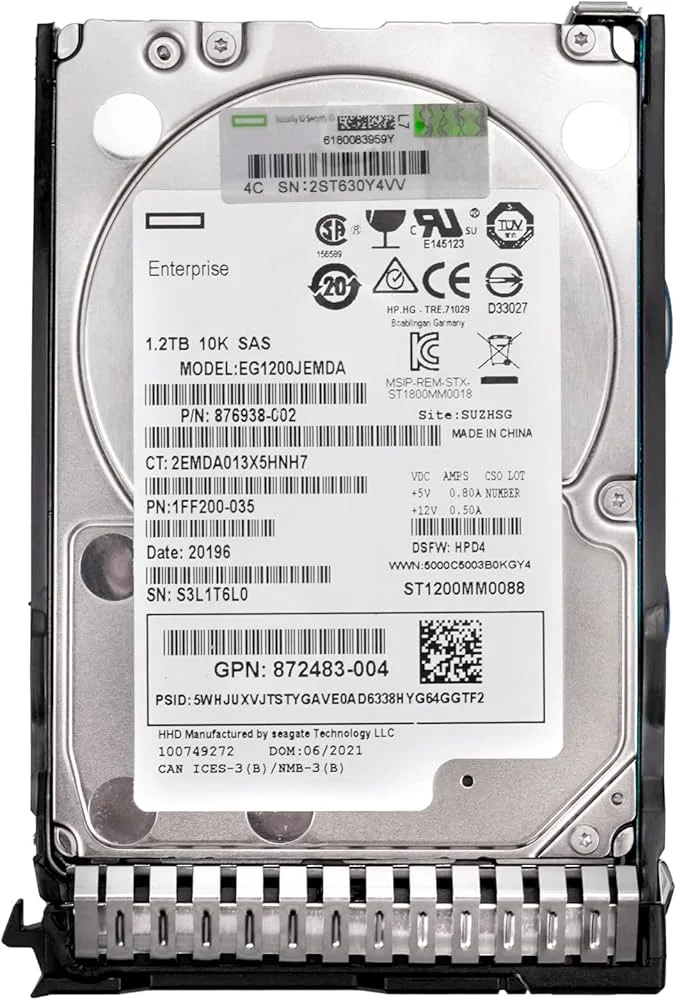
HPE 1.2TB 10K SAS HDD
Original price was: KSh29,999.KSh29,500Current price is: KSh29,500.
Description
HPE 1.2TB 10K SAS HDD: Complete Buying Guide for Kenya
When a server hard drive starts failing, the cost is rarely limited to the replacement disk. A degraded RAID array can reduce performance, increase rebuild times, create operational risk and, in the worst case, expose a business to data loss and downtime.
For an organisation running accounting systems, databases, file sharing, ERP applications or other business-critical workloads, postponing a failing-drive replacement can be more expensive than replacing the drive proactively.
This is where an enterprise-grade HPE 1.2TB 10K SAS HDD such as 872479-B21 can be relevant for compatible HPE server environments. It combines 1.2TB capacity with 10,000 RPM SAS technology in a 2.5-inch form factor, making it suitable for organisations that still rely on enterprise HDD storage rather than moving every workload to SSD.
What Is an HPE 1.2TB 10K SAS HDD?
The HPE 1.2TB 10K SAS HDD is an enterprise server hard drive designed for compatible HPE ProLiant environments.
The 872479-B21 part number is particularly useful when searching for an exact replacement because enterprise buyers often need a drive matching an existing server’s storage configuration rather than simply any 1.2TB disk.
Key characteristics include:
- 1.2TB nominal capacity
- 10,000 RPM rotational speed
- 2.5-inch form factor
- SAS interface
- Enterprise-oriented design
- Suitable for compatible HPE server storage configurations
- Designed for workloads where reliability and predictable enterprise storage operation matter
For organisations in Nairobi, Mombasa, Kisumu, Nakuru, Eldoret or other locations in Kenya, the key question is not simply “How much storage do I need?” but rather:
“What drive is compatible with my server, controller, backplane and existing RAID configuration?”
Why 1.2TB SAS Storage Still Matters
The market has moved heavily toward SSDs, but mechanical SAS drives remain relevant in many enterprise environments.
A business may already have a server populated with SAS HDDs. Replacing one failed drive with an incompatible SATA disk or an incorrectly configured drive can introduce unnecessary compatibility and RAID problems.
A compatible 1.2TB SAS 10K 2.5-inch server hard drive can therefore be a practical replacement or capacity-expansion option.
Common situations include:
- Replacing a failed RAID disk
- Expanding server storage
- Maintaining an existing HPE ProLiant environment
- Replacing an ageing enterprise HDD
- Maintaining spare drives for disaster recovery
- Supporting file servers
- Supporting business applications
- Maintaining legacy enterprise infrastructure
For example, an SME in Nairobi running its accounting, document management and shared-file environment on an HPE ProLiant server may prefer maintaining a consistent SAS drive configuration rather than replacing the entire storage subsystem.
HPE 872479-B21: What You Need to Know
872479-B21 is one of the most important search terms to use when looking for this particular drive.
IT administrators frequently search by:
- HPE 872479-B21
- HP 872479-B21
- 872479-B21 Kenya
- 872479-B21 price in Kenya
- HPE 872479-B21 price Kenya
- HPE 1.2TB SAS 10K HDD Kenya
Searching by the part number can be more reliable than searching only for “1.2TB SAS HDD”, because numerous enterprise drives can have similar headline specifications.
Why the part number matters
Before ordering a server replacement drive, verify:
- Server model
- Storage controller
- Backplane
- Drive carrier/caddy
- SAS generation
- Existing RAID configuration
- Drive capacity
- Drive speed
- Sector format
- HPE compatibility
Do not assume that every 1.2TB SAS drive is interchangeable.
SAS vs SATA: Why Enterprises Use SAS
Serial Attached SCSI, or SAS, evolved from the traditional SCSI ecosystem while introducing a serial physical and electrical interface.
Compared with consumer-oriented SATA storage, SAS is designed around enterprise storage requirements such as:
- Enterprise server environments
- Multi-drive storage systems
- RAID configurations
- High availability
- Predictable storage behaviour
- Serviceability
- Data integrity
- Scalability
This makes SAS particularly relevant in servers where storage is part of a larger managed infrastructure.
SAS is not automatically faster than every SSD
This distinction is important.
A 10K SAS HDD remains a mechanical drive. A modern enterprise SSD will generally provide dramatically lower latency and higher IOPS.
The reason to choose a 10K SAS HDD today is therefore often compatibility, capacity, existing infrastructure, cost and workload requirements, rather than maximum storage performance.
What Does 10K RPM Mean?
10K RPM means the disk platters rotate at approximately 10,000 revolutions per minute.
Higher rotational speed can reduce rotational latency compared with slower mechanical drives.
This made 10K SAS drives popular for workloads requiring better random-access performance than traditional slower enterprise HDDs could provide.
However, businesses should not confuse rotational speed with SSD performance.
Simple comparison
| Storage | Technology | Typical advantage |
|---|---|---|
| 7.2K SAS HDD | Mechanical | Capacity and cost |
| 10K SAS HDD | Mechanical | Better HDD responsiveness |
| SATA SSD | Flash | Much lower latency |
| Enterprise SAS SSD | Flash | High enterprise performance |
| NVMe SSD | Flash | Very high throughput and IOPS |
For an existing HPE server built around SAS HDDs, a compatible 1.2TB 10K SAS 2.5-inch HDD can still be a sensible replacement.
Understanding 512e and Data Integrity
Enterprise hard drives may use sector formats designed to work with modern storage systems while maintaining compatibility with legacy applications.
512e refers to a drive that uses a physical sector size of 4K while presenting a 512-byte logical sector interface to the host.
One reason this matters is compatibility.
Storage controllers, operating systems and applications need to understand how sectors are presented.
Why this matters during replacement
If you are replacing an existing drive in a RAID array, don’t choose a replacement based only on capacity.
Check:
- Logical sector format
- Physical sector format
- Controller compatibility
- RAID requirements
- Firmware
- Drive type
A drive that appears to have the correct capacity may still be unsuitable for a particular configuration.
What Is Zone Bit Recording?
Mechanical HDDs don’t necessarily store the same number of sectors on every track.
Zone Bit Recording (ZBR) divides the platter into zones and allows outer zones to contain more sectors because they have greater physical circumference.
This improves storage efficiency.
It is also relevant when discussing why mechanical HPE 1.2TB 10K SAS HDD performance can vary depending on where data is located on the platter.
ZBR vs Constant Linear Velocity
For HPE 1.2TB 10K SAS HDD, ZBR is the practical concept to understand when discussing modern disk geometry.
The outer tracks can generally provide higher sequential transfer rates because more data can pass under the heads during each rotation.
Consequently, HDD performance is not necessarily identical from the beginning to the end of the usable disk surface.
What Is Short Stroking?
Short stroking deliberately limits the portion of the disk used so that the drive heads operate over a smaller area.
The objective is to reduce seek distance and improve access performance.
It can make sense in specialised performance-sensitive environments, but it comes at a significant cost:
You sacrifice usable storage capacity.
For modern deployments, organisations should normally evaluate SSDs or NVMe storage before intentionally sacrificing HDD capacity through short stroking.
Entry-Level, Mid-Range and Premium Storage Options
Choosing a server drive should depend on workload rather than simply selecting the cheapest disk.
| Tier | Typical requirement | Storage approach | Best suited for |
|---|---|---|---|
| Entry-Level | Basic file storage | Lower-cost HDD/SATA | Small offices |
| Mid-Range | Existing enterprise server | 10K SAS HDD | SMB servers, RAID |
| Premium | High-performance workloads | Enterprise SSD/NVMe | Databases, virtualization |
The HPE 1.2TB 10K SAS HDD sits primarily in the Mid-Range enterprise HDD category.
It is particularly attractive when maintaining an existing HPE ProLiant server.
HPE 1.2TB 10K SAS HDD: Best Use Cases
1. RAID Replacement
One of the strongest applications is replacing a failed drive in an existing RAID array.
For example, an organisation may have an HPE ProLiant server with several SAS drives. If one drive reports a failure or predictive failure, replacing it quickly can reduce the period during which the array operates in a degraded state.
Business benefit: Reduced exposure to further drive failure and potential data unavailability.
2. File Servers
A business with centralised file storage can use enterprise SAS HDDs where high-end SSD performance isn’t necessary.
Typical users include:
- Accounting departments
- HR departments
- Schools
- NGOs
- SMEs
- Professional firms
Business benefit: Centralised storage can simplify access control, backups and file management.
3. Business Applications
Some organisations continue to run ERP, accounting and internal applications on physical servers.
Examples include:
- ERP
- CRM
- Accounting
- Inventory systems
- Document management
- Shared databases
Business benefit: Enterprise storage can provide a more structured platform for business-critical applications than consumer-grade desktop drives.
Real-World Kenyan Use Cases
Nairobi
A Nairobi-based professional-services company running an HPE ProLiant server may need replacement SAS drives for its accounting, document management and internal applications.
The priority is often availability and compatibility, not simply maximum benchmark performance.
Mombasa
A logistics or distribution company may rely on a central server for inventory, accounting and operational records.
A replacement HPE 1.2TB SAS HDD can help maintain an existing storage infrastructure when a RAID drive requires replacement.
Kisumu
Schools, healthcare organisations and SMEs may operate local servers for file sharing and business applications.
A consistent enterprise storage platform makes it easier for IT administrators to manage storage and backups.
Nakuru
A growing business may initially have sufficient server storage but later require additional capacity.
Before expanding, administrators should check whether the server’s RAID controller and drive configuration support the proposed capacity and drive type.
Eldoret
Businesses supporting regional operations may rely on local servers for applications and file storage.
Keeping compatible replacement drives available can reduce downtime when hardware failures occur.
Turkana
For remote or branch environments where replacement hardware may take longer to source, maintaining spare compatible server drives can be particularly valuable.
This is an important operational consideration: the cost of downtime can exceed the cost of keeping critical replacement hardware available.
Can You Replace a 900GB SAS Drive With a 1.2TB Drive?
Potentially, yes—but capacity alone does not determine compatibility.
A replacement drive must be compatible with:
- Server
- RAID controller
- Backplane
- SAS interface
- Sector format
- RAID configuration
- Drive firmware/configuration
If you are replacing a drive in an existing RAID array, the controller may impose additional requirements.
Important principle
A larger drive does not necessarily mean the RAID array will automatically use its entire capacity.
For example, replacing a smaller drive with a larger drive may result in unused capacity until the RAID configuration is expanded.
Always verify the RAID controller documentation before making the replacement.
Can You Format a HPE 1.2TB 10K SAS HDD?
Yes.
However, formatting depends on how the drive is connected.
A SAS drive installed in a server normally passes through a:
Drive → Backplane → SAS controller/RAID controller → Operating system
If the drive is part of a RAID array, you generally don’t format the individual physical disk from Windows in the same way you would format a standalone desktop drive.
Instead, the RAID controller manages the physical disks and presents a logical volume to the operating system.
Before formatting
Check:
- Whether the disk contains existing data
- Whether it belongs to a RAID array
- RAID controller configuration
- Logical volume configuration
- Backup status
- Operating system requirements
Never format a suspected RAID member simply because Windows shows it as unavailable.
Does a SAS Drive Need Preparation Before Installation?
For a replacement drive, the most important preparation is compatibility verification.
Before installation:
- Confirm the server model.
- Confirm the controller.
- Confirm the backplane.
- Verify drive capacity.
- Verify interface and sector format.
- Back up critical data.
- Check the RAID array status.
- Follow the server manufacturer’s replacement procedure.
If the drive is a replacement for a failed RAID member, the RAID controller may automatically begin rebuilding after the new drive is installed, depending on the configuration.
Can Drives With 95–100% Health Be Used in RAID?
A drive reporting 95–100% health may still be usable, but health percentage alone is not enough to determine whether a disk belongs in a production RAID array.
Look at:
- SMART attributes
- Media errors
- Predictive failure indicators
- Bad sectors
- Read/write errors
- Drive age
- Power-on hours
- RAID controller alerts
- Firmware status
- Previous failure history
For critical systems, don’t mix questionable drives into a RAID array simply because a monitoring application reports a high health percentage.
Better practice
Use enterprise monitoring and the server’s RAID controller diagnostics to determine whether the drive is suitable for production.
HPE ProLiant Compatibility
The keyword cluster around HPE ProLiant is commercially valuable:
- HPE ProLiant 1.2TB SAS HDD
- HPE ProLiant SAS hard drive
- HPE ProLiant server hard drive Kenya
- HPE ProLiant DL360 SAS HDD
- HPE ProLiant DL380 SAS HDD
- HPE ProLiant DL560 SAS HDD
- HPE ProLiant ML350 SAS HDD
However, don’t assume that 872479-B21 is automatically compatible with every ProLiant model listed above.
Compatibility should be confirmed against the exact server generation, controller and drive configuration.
This is particularly important because HPE has used different drive generations, carriers, controllers and storage architectures across ProLiant generations.
Honest Pros and Cons
Pros
- Enterprise-oriented SAS interface
- 1.2TB capacity
- 10K RPM mechanical performance
- 2.5-inch form factor
- Suitable for compatible HPE server environments
- Useful for RAID replacement
- Can extend the life of an existing server infrastructure
- More appropriate for enterprise server environments than consumer desktop HDDs
Cons
- Mechanical HDD performance is substantially below modern SSD/NVMe storage.
- 1.2TB may be insufficient for rapidly growing data environments.
- Compatibility must be checked carefully.
- Existing RAID configurations can complicate replacement.
- Older server infrastructure may have higher power and maintenance requirements than modern platforms.
Bottom line: this is not the drive to buy simply because it is 10K RPM. It makes the most sense when its enterprise SAS characteristics and compatibility match the server environment.
HPE 1.2TB SAS HDD vs SSD
| Feature | 1.2TB 10K SAS HDD | Enterprise SSD |
|---|---|---|
| Technology | Mechanical | Flash |
| Rotational speed | 10K RPM | N/A |
| Latency | Higher | Much lower |
| Random I/O | Limited compared with SSD | Excellent |
| Capacity | 1.2TB | Varies |
| Existing SAS infrastructure | Excellent fit where supported | Depends on platform |
| Cost strategy | Useful for existing HDD arrays | Higher initial cost |
| Best use | Existing enterprise HDD infrastructure | Performance-intensive workloads |
Recommendation
If you’re replacing a failed drive in an existing SAS RAID array, staying with a compatible SAS HDD may be the least disruptive option.
If you’re designing a new server, however, compare the total cost of ownership and workload requirements against enterprise SSD or NVMe storage.
Pricing in Kenya
The HPE 1.2TB 10K SAS HDD / 872479-B21 price in Kenya can vary depending on:
- New vs refurbished condition
- HPE original vs third-party drive
- Availability
- Warranty
- Drive carrier
- Firmware
- Import costs
- Exchange-rate movements
- Supplier stock
For this reason, a fixed generic online price can quickly become misleading.
For procurement, request a quotation that clearly states:
- Exact HPE part number
- Capacity
- Interface
- RPM
- Form factor
- Condition
- Warranty
- Availability
- Delivery time
- VAT status
Why Buy From a Specialist Server Supplier?
A server hard drive is not simply a commodity storage device.
The correct replacement requires understanding the entire storage stack.
A specialist supplier should be able to help you identify:
Server → Backplane → Controller → RAID → Drive
This can prevent a common procurement mistake: purchasing a technically similar disk that doesn’t work correctly in the customer’s server.
For organisations in Kenya, local technical support and availability can also reduce the time spent waiting for replacement infrastructure.
What is 872479-B21?
872479-B21 is a part number associated with an HPE 1.2TB 10K SAS enterprise hard-drive configuration. Buyers should verify the exact configuration and compatibility before ordering.
What is the HPE 1.2TB 10K SAS HDD used for?
It is intended for compatible enterprise server/storage environments, particularly where organisations need replacement or additional SAS HDD capacity.
Is a HPE 1.2TB 10K SAS HDD still good?
Yes, particularly for maintaining existing enterprise HDD infrastructure. However, SSDs and NVMe drives provide significantly better performance for workloads requiring high IOPS and low latency.
Can I use a 1.2TB SAS drive in any server?
No. Server compatibility depends on the SAS controller, backplane, drive carrier, firmware, sector format and server generation.
Can I replace a 900GB SAS drive with 1.2TB?
Possibly. The server and RAID controller must support the replacement drive, and the RAID configuration may determine how much of the additional capacity can actually be used.
Is SAS better than SATA?
For enterprise server environments, SAS provides features and connectivity designed around managed enterprise storage. However, SATA can be appropriate for less demanding workloads, while SSD/NVMe is generally preferable where performance is the priority.
Is HPE 1.2TB 10K SAS HDD enough for a server?
It depends on the workload. A 1.2TB drive can be adequate for many file, application and RAID configurations, but businesses with rapidly growing databases, video or large datasets may require substantially more storage.
Should I buy used SAS drives?
Used or refurbished enterprise drives can reduce acquisition costs, but buyers should consider remaining drive life, SMART data, warranty, firmware and supplier reputation.
Final Verdict
The HPE 1.2TB 10K SAS HDD is best viewed as an enterprise replacement and infrastructure-maintenance drive, rather than a modern high-performance storage solution.
Best budget option
For businesses maintaining older HPE servers, a compatible enterprise SAS HDD can be a cost-effective way to keep existing infrastructure operational.
Best SME option
For an SME already running an HPE ProLiant server with 10K SAS drives, 872479-B21 can be worth considering when it matches the existing storage configuration.
Best enterprise option
For new high-performance deployments, compare enterprise SSD and NVMe options. The higher acquisition cost can be justified by lower latency, greater IOPS and better application performance.
Best replacement strategy
If a RAID drive has failed, don’t simply search for “1.2TB hard drive.”
Search using the server model, controller and exact part number:
HPE 872479-B21 → verify server compatibility → verify RAID controller → confirm condition/warranty → order replacement.
Related products