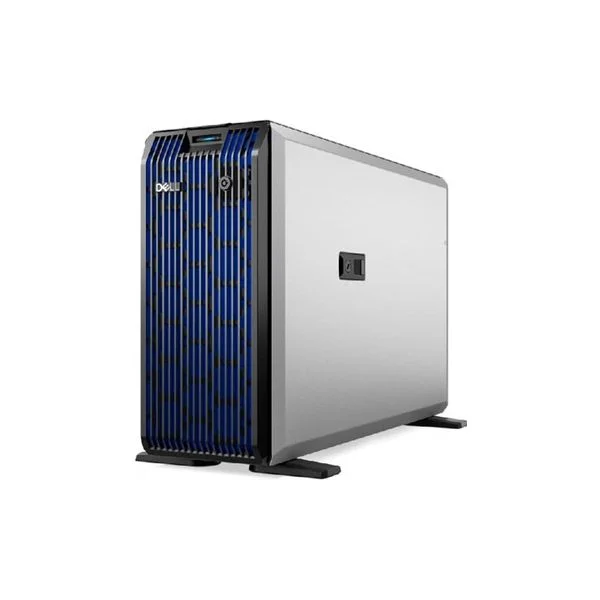
Dell PowerEdge T160
Dell PowerEdge T160 Server Original price was: KSh310,000.Current price is: KSh290,000.
Back to products

Dell PowerEdge T360

Original price was: KSh290,000.Current price is: KSh285,000.

Description

Description

Dell PowerEdge T360 Price in Kenya: Complete Buying Guide for SMEs and Growing Businesses

A growing business rarely notices the exact moment its IT infrastructure becomes inadequate.

It usually starts with something small.

The accounting system takes longer to open. Shared files become slower to access. Employees complain about application performance. Backups take longer. The business adds another database, more users, more surveillance cameras or another business application—and suddenly the server that was “good enough” two years ago becomes the bottleneck.

For a Nairobi SME running accounting and ERP applications, a school managing student records, a hospital storing patient information, or a logistics company coordinating operations between Nairobi, Mombasa and other branches, unreliable infrastructure can become an expensive operational problem.

The consequences extend beyond slow computers:

  • Lost employee productivity
  • Application downtime
  • Data corruption
  • Longer backup windows
  • Poor database performance
  • Difficulty adding new users
  • Higher maintenance costs
  • Increased security and business-continuity risks

The problem with postponing a server upgrade is that the cost isn’t limited to the server itself. Every hour employees spend waiting for systems, every failed backup and every interruption to a business-critical application has a financial impact.

That’s where the Dell PowerEdge T360 becomes relevant.

When Your Office Outgrows Its IT Infrastructure

The Dell PowerEdge T360 is a 4.5U tower server designed for small and growing businesses, branch offices, and organizations that need dedicated server infrastructure without installing a conventional rack server.

It belongs to Dell’s current-generation tower-server family and supports Intel Xeon E-2400 series processors, DDR5 memory, PCIe Gen5 expansion and enterprise storage/controller options. Configurations can include PERC H355 or H755 controllers and Dell’s BOSS-N1 subsystem for two M.2 NVMe SSDs.

Why the Dell PowerEdge T360 Matters for Kenyan Businesses

A server should be evaluated according to the business problem it solves—not simply its processor, RAM or storage capacity.

For a growing company, the T360 can provide a centralized platform for:

  • File sharing
  • Accounting applications
  • ERP software
  • Databases
  • Active Directory
  • Print management
  • Business applications
  • Backup services
  • Virtual machines
  • Branch-office workloads
  • Surveillance-related workloads
  • Collaboration applications

Instead of having important data distributed across individual employee computers, businesses can centralize applications and information on dedicated infrastructure.

That improves manageability and can make backup, access control and business continuity easier to implement.

Dell PowerEdge T360 Key Specifications

Exact specifications depend on the configuration purchased, but the platform supports:

Specification Dell PowerEdge T360
Form factor 4.5U Tower
Processor family Intel Xeon E-2400 series
Memory DDR5 ECC
Memory slots 4 DIMM slots
Maximum memory Up to 128GB in supported configurations
Storage SATA/SAS HDD and SSD options
NVMe BOSS-N1 option with 2 × M.2 NVMe SSDs
RAID controllers PERC H355 / PERC H755
Network Dual 1GbE options
Management iDRAC9
Expansion PCIe Gen4 / Gen5 depending on slot
Power Multiple PSU configurations
Chassis Tower

Current configurations available in Kenya demonstrate how significantly pricing can change depending on CPU, storage controller, drive configuration, RAM and power-supply configuration.

Dell PowerEdge T360 Price in Kenya

There isn’t one universal Dell PowerEdge T360 Price in Kenya because Dell sells the platform in multiple configurations.

For example, current Kenyan-market listings show configurations ranging from approximately KSh 168,809 for a basic advertised configuration to substantially higher prices for configurations with stronger processors, enterprise RAID controllers, additional storage and redundant power supplies.

Another current Kenya listing shows a T360 with Xeon E-2414, 16GB memory, 480GB SSD, PERC H355, iDRAC9 Basic and dual 700W power supplies at over KSh 486,000.

Why are the prices so different?

Because “Dell PowerEdge T360” describes the server platform, not a single fixed configuration.

When requesting a quotation, specify:

  • Processor
  • RAM capacity
  • Number and type of drives
  • RAID controller
  • M.2/NVMe requirements
  • Network requirements
  • Power-supply configuration
  • Warranty period
  • Operating system
  • Installation requirements

This prevents comparing two T360 quotations that appear similar but contain very different hardware.

Quick Buying Guide: Which Server Tier Is Right for You?

Tier Typical User Budget Direction Recommended Approach
Entry-Level Small offices / basic applications Lower T160 or entry T360
Mid-Range Growing SMEs Medium Dell PowerEdge T360
Premium Data-intensive SMEs / virtualization Higher Higher-spec T360 or rack server
Enterprise Heavy virtualization / large databases High PowerEdge R-Series

For many Kenyan SMEs, the Dell PowerEdge T360 occupies an attractive middle ground: more capable and expandable than an entry-level tower server while remaining easier to deploy in an office than a rack-mounted infrastructure platform.

Dell PowerEdge T360 for Small Business

Best for:

  • 10–100+ user environments depending on workload
  • Accounting systems
  • ERP
  • File sharing
  • Active Directory
  • Database applications
  • Print services
  • Virtualization
  • Branch-office infrastructure

The actual number of users a server can support cannot be determined from the T360 model alone. A 30-user database workload can be considerably more demanding than 100 users primarily accessing static files.

The application, database size, RAM, storage subsystem and workload concurrency matter more than simply counting users.

DDR5 ECC Memory: Why It Matters

One of the questions buyers frequently ask is:

Does the Dell PowerEdge T360 use DDR5 ECC RAM?

Yes. The T360 platform uses DDR5 ECC memory in supported configurations.

ECC—Error-Correcting Code—helps detect and correct certain types of memory errors.

For business systems, that matters because server memory is involved in everything from databases and accounting applications to operating-system processes and virtual machines.

Business benefit

ECC memory helps improve system reliability and reduces the risk that a transient memory error becomes a system or data-integrity problem.

For organizations where downtime is expensive, that reliability is more important than simply choosing RAM with the highest advertised speed.

Can You Upgrade the RAM?

Yes.

The T360 provides four DIMM slots, with supported configurations reaching up to 128GB depending on the memory configuration.

However, don’t simply purchase any DDR5 desktop memory.

For a server upgrade, check:

  • ECC support
  • UDIMM compatibility
  • Capacity
  • Speed
  • Dell compatibility
  • Existing DIMM configuration
  • Supported population rules

Recommendation: When upgrading a T360, match the server’s supported memory specifications rather than buying generic consumer DDR5 RAM.

Does the Dell PowerEdge T360 Support M.2 NVMe SSDs?

Yes—but configuration matters.

This is an important distinction because the T360 does not simply mean “install any M.2 SSD directly onto the motherboard.”

Dell documents support for the BOSS-N1 (Boot Optimized Storage Subsystem), which provides hardware RAID for two M.2 NVMe SSDs.

What is BOSS-N1?

BOSS-N1 is designed primarily for operating-system boot storage.

A typical configuration can use two M.2 NVMe SSDs in a mirrored arrangement, providing redundancy for the operating system.

Why is this useful?

Imagine a business running Windows Server from a single SSD.

If that SSD fails, the operating system can become unavailable.

Using an appropriate mirrored BOSS configuration can improve boot-storage resilience.

It is therefore important to distinguish:

M.2 NVMe boot storage ≠ general-purpose enterprise data storage.

For large business datasets, you may still want dedicated SAS/SATA SSDs or HDDs managed through an appropriate RAID controller.

What Is the PERC H355 Controller?

The PERC H355 is one of the internal storage controllers supported by the PowerEdge T360. Dell also lists the PERC H755 and HBA355i among supported internal controller options.

PERC stands for PowerEdge RAID Controller.

Its purpose is to manage compatible storage devices and provide RAID functionality.

Depending on the specific controller and configuration, RAID can provide:

  • Data redundancy
  • Drive fault tolerance
  • Improved availability
  • Storage management
  • Performance optimization in appropriate configurations

PERC H355 vs H755

Don’t assume that every T360 needs the most expensive controller.

The right controller depends on:

  • Number of drives
  • RAID level
  • Performance requirements
  • SSD vs HDD
  • Database workload
  • Redundancy requirements
  • Budget

For straightforward SME workloads, an H355-based configuration may be sufficient. More demanding storage environments may justify the H755.

How to Install Windows Server on Dell PowerEdge T360

The T360 supports Windows Server configurations, but installation should be treated as a server deployment rather than simply installing Windows on an office PC.

A typical deployment involves:

1. Configure the storage

Before installing Windows Server, configure the required RAID or BOSS storage arrangement.

2. Enter System Setup

Dell’s documentation states that you can access the System BIOS by powering on the server and pressing F2. The System BIOS provides settings for memory, processors, SATA, boot configuration, integrated devices, security and other system functions.

3. Configure UEFI

Use the appropriate UEFI boot configuration.

4. Boot from Windows Server installation media

Use Dell’s supported installation method and drivers.

5. Install drivers and firmware

After installation:

  • Install required Dell drivers
  • Update firmware
  • Configure iDRAC
  • Configure networking
  • Configure storage
  • Apply Windows updates

6. Configure server roles

Depending on the business, this could include:

  • Active Directory
  • DNS
  • DHCP
  • File Services
  • Print Services
  • Hyper-V
  • Database services

Professional recommendation: For production deployments, have the server configured by an experienced server technician rather than treating the installation as a normal desktop Windows installation.

How to Upgrade BIOS on Dell PowerEdge T360

Another common buyer question is:

How do I upgrade BIOS on Dell PowerEdge T360?

The safest approach is to use Dell’s official support resources and identify the server using its Service Tag.

A typical process is:

  1. Identify the T360 Service Tag.
  2. Go to Dell Support.
  3. Select the correct PowerEdge T360.
  4. Review available BIOS updates.
  5. Check the release notes.
  6. Confirm compatibility.
  7. Back up important data.
  8. Apply the BIOS update using a supported Dell method.
  9. Allow the server to restart and complete the update.
  10. Verify BIOS version afterward.

Do not interrupt power during a firmware update.

Dell’s T360 documentation provides the BIOS/System Setup options and configuration information.

Is the Dell PowerEdge T360 Noisy?

This is a legitimate concern if you intend to install the server in an office rather than a dedicated server room.

The T360 is an enterprise tower server, so buyers should not expect it to operate like a silent desktop PC.

Fan activity depends on:

  • CPU workload
  • Ambient temperature
  • Drive configuration
  • GPU configuration
  • PSU configuration
  • Firmware settings
  • System profile

Practical recommendation

For an office environment:

Best: dedicated server/IT room
Acceptable: secure equipment room
Less ideal: open-plan employee workspace

If noise is a major consideration, request the acoustic characteristics of the exact configuration rather than assuming every T360 behaves identically.

Are Dell PowerEdge Upgrades Expensive?

They can be—but the correct question is whether the upgrade is economically justified.

Enterprise components cost more because they can include:

  • ECC memory
  • Enterprise SSDs
  • SAS drives
  • RAID controllers
  • Hot-plug capability
  • Dell-qualified firmware
  • Enterprise warranties

For example, upgrading from 16GB to 32GB or 64GB may cost significantly less than replacing the entire server.

Think about lifecycle cost

Suppose your server is slowing down because of insufficient RAM.

Replacing a functioning server could mean paying for:

  • New hardware
  • Windows Server licensing
  • Migration
  • Installation
  • Configuration
  • Downtime

A RAM or storage upgrade may extend the useful life of the existing infrastructure.

That is why the T360’s expandability is important.

Dell PowerEdge T360 Business Benefits

1. Centralized IT Infrastructure

Instead of relying on multiple desktops to store business information, the T360 can centralize critical services.

Benefit: easier administration and backup.

2. Improved Reliability

ECC memory, enterprise storage controllers and server management features provide infrastructure designed for continuous business workloads.

Benefit: lower operational risk.

3. Expandability

The T360 supports multiple storage configurations and PCIe expansion.

Benefit: your infrastructure can grow with the business.

4. Remote Management with iDRAC9

The T360 supports iDRAC9, Dell’s integrated server-management platform.

IT administrators can use remote management capabilities to monitor and administer the server without physically sitting in front of it.

This is especially useful when supporting:

  • Branch offices
  • Remote sites
  • After-hours maintenance
  • Distributed organizations

Real-World Kenyan Use Cases

Nairobi SMEs

A Nairobi accounting or consulting firm can use the T360 for:

  • QuickBooks
  • Sage
  • File sharing
  • Active Directory
  • Print services
  • Backup

Mombasa Businesses

A hotel, logistics company or travel business can use it to centralize business applications and databases while keeping the server physically in the office.

Kisumu Organizations

Schools, NGOs and professional organizations can deploy the T360 for centralized file storage, applications and user management.

Nakuru Businesses

Agricultural businesses, distributors and professional offices can use the server for accounting, inventory and ERP workloads.

Eldoret Organizations

Universities, healthcare organizations and growing enterprises can use the T360 as a centralized infrastructure platform for applications and databases.

Best Dell PowerEdge T360 Configuration by Workload

Workload Suggested Approach
File sharing 16–32GB RAM + redundant storage
QuickBooks/Sage 32GB RAM + SSD storage
Small database 32–64GB RAM + enterprise SSD
Virtualization 64–128GB RAM + fast storage
Backup server High-capacity HDD configuration
ERP 32–64GB+ depending on application
Multiple VMs 64–128GB + SSD/NVMe boot + appropriate storage

These are starting points rather than universal specifications. Application vendors should be consulted for workload-specific requirements.

Dell PowerEdge T360 vs Entry-Level and Premium Servers

Category Entry-Level Mid-Range Premium
Example Dell T160 Dell T360 Dell R-Series
Form factor Compact tower 4.5U tower Rack
Business size Small Growing SME Medium/large enterprise
Expandability Moderate High Very high
Virtualization Light Moderate Heavy
Storage Basic/moderate Flexible Advanced
Management Enterprise iDRAC9 Advanced enterprise
Office deployment Excellent Good Usually server room
Price Lower Medium Higher

Pros and Cons of the Dell PowerEdge T360

Pros

  • Enterprise-grade tower-server architecture
  • Intel Xeon E-2400 processors
  • DDR5 ECC memory
  • PCIe Gen5 support
  • Multiple storage options
  • PERC RAID controller options
  • BOSS-N1 M.2 NVMe support
  • iDRAC9 management
  • Suitable for office environments
  • Expandable as business requirements increase

Cons

  • More expensive than a conventional desktop PC
  • Enterprise RAM and storage can be costly
  • Tower occupies considerable physical space
  • Fan noise can be noticeable under load
  • Exact storage capability depends on chassis/configuration
  • Advanced configurations can become expensive

The important point is that these aren’t necessarily weaknesses. They’re trade-offs associated with moving from consumer/desktop hardware to dedicated server infrastructure.

Dell PowerEdge T360

Is the Dell PowerEdge T360 good for a small business?

Yes. The Dell PowerEdge T360 is designed as a tower-server platform suitable for growing businesses that need centralized applications, storage, databases, virtualization and other server workloads.

How much does the Dell PowerEdge T360 cost in Kenya?

Current Kenyan listings show significant configuration-dependent variation, from roughly KSh 168,809 for an advertised basic configuration to over KSh 486,000 for a more highly specified configuration. Always compare the complete specification rather than the headline price.

Does Dell PowerEdge T360 use DDR5 ECC RAM?

Yes. The T360 supports DDR5 ECC memory. Current configurations list DDR5 memory, with four DIMM slots and configurations up to 128GB.

Does Dell PowerEdge T360 support M.2 NVMe?

Yes. Dell documents the optional BOSS-N1 subsystem, which supports two M.2 NVMe SSDs in a hardware RAID configuration for boot storage.

What RAID controllers does the T360 support?

Dell lists the PERC H355, PERC H755 and HBA355i as supported internal controller options, with HBA355e available externally.

Does the T360 support iDRAC?

Yes. The PowerEdge T360 supports iDRAC9 for remote server management.

Can I install Windows Server on the Dell PowerEdge T360?

Yes. The T360 is designed to support server operating-system deployments. The correct installation procedure should account for the storage controller, RAID configuration, UEFI and required Dell drivers.

Is the Dell T360 suitable for QuickBooks?

Yes, potentially. It can be an excellent platform for QuickBooks in a multi-user business environment, but the correct RAM, storage and Windows Server configuration should be selected according to the number of users and QuickBooks deployment architecture.

Is the Dell PowerEdge T360 suitable for virtualization?

Yes. Its Xeon processor, ECC memory, storage options and PCIe expansion make it suitable for virtualization. For multiple demanding virtual machines, configure the server with sufficient RAM and high-performance storage.

Is the Dell PowerEdge T360 suitable for an office?

Yes. Its tower design makes it easier to deploy outside a traditional rack environment. However, it should ideally be located in a dedicated IT/equipment room because it is still an enterprise server and can produce noticeable fan noise.

Final Verdict: Should You Buy the Dell PowerEdge T360?

The Dell PowerEdge T360 makes the most sense for a business that has outgrown desktop-based infrastructure but doesn’t necessarily need a large rack-mounted server.

Best Budget Option

For basic file sharing, Active Directory and lightweight business applications, consider a lower-cost configuration or the smaller T160.

Best SME Option

Dell PowerEdge T360

For a growing Kenyan SME running accounting, ERP, databases, file sharing and business applications, the T360 offers a strong balance between performance, expandability and manageability.

Best Performance Configuration

Choose a T360 configured with:

  • Higher-end Xeon E-2400 processor
  • 64GB–128GB ECC RAM
  • Enterprise SSDs
  • Appropriate PERC controller
  • BOSS-N1 for redundant boot storage
  • Redundant power supplies where business continuity requires it

Best Enterprise Option

If you are running numerous virtual machines, large databases or highly demanding workloads, a Dell PowerEdge R-Series rack server may provide a better long-term platform.

Why Buy Your Dell PowerEdge T360 from a Specialist?

When purchasing a server, the cheapest quotation isn’t necessarily the cheapest solution.

A proper server quotation should account for:

  • Hardware compatibility
  • RAID configuration
  • RAM expansion
  • Storage requirements
  • Windows Server licensing
  • Warranty
  • Installation
  • Data migration
  • Backup
  • UPS protection
  • Future expansion

A Dell PowerEdge T360 supplier in Kenya should therefore help you select a complete configuration rather than simply selling a bare server chassis.

Internal Linking Opportunities for Your Website

For your Minify ecommerce site, link the T360 page to:

Server Categories

  • Dell Servers Kenya
  • Tower Servers Kenya
  • Rack Servers Kenya
  • Enterprise Servers
  • Small Business Servers

Storage

  • Server HDDs
  • Enterprise SSDs
  • SAS Drives
  • NVMe SSDs
  • RAID Controllers

Infrastructure

  • Server Racks
  • UPS Systems
  • Network Switches
  • Enterprise Routers
  • Network Attached Storage

Software

  • Windows Server
  • Microsoft Windows Server Licensing
  • Backup Solutions
  • Virtualization Solutions

Related Dell Products

  • Dell PowerEdge T160
  • Dell PowerEdge T350
  • Dell PowerEdge R360
  • Dell PowerEdge R260
  • Dell PowerEdge R660xs

Conclusion: Dell PowerEdge T360 Kenya

The Dell PowerEdge T360 is not simply a faster computer. It is an infrastructure platform designed to give a growing organization more control over its applications, data, storage and IT operations.

Its combination of Intel Xeon E-2400 processors, DDR5 ECC memory, flexible storage, PERC RAID options, BOSS-N1 M.2 NVMe support and iDRAC9 management makes it particularly compelling for Kenyan SMEs and organizations that need dependable on-premises computing.

The most important buying decision, however, isn’t choosing the T360 model itself. It’s choosing the right configuration.

A 16GB/480GB entry configuration and a 128GB/high-performance storage configuration can have dramatically different capabilities and prices.

If you’re looking for the Dell PowerEdge T360 Price in Kenya, don’t buy based on the server name alone. Tell us your number of users, applications, storage requirements, virtualization needs and budget, and request a configuration-specific quotation.

Browse Dell PowerEdge servers or contact Minify Solutions for a quotation for the Dell PowerEdge T360 Tower Server in Kenya.